Play Their Way
Supporting child-first coaching development
Services
UI & UX Design
Company
Play Their Way/
UK Coaching
Industry
Sport/Education/
Charity
Year
2025
Play Their Way is a child-first coaching platform run by charity UK Coaching in collaboration with the Children’s Coaching Collaborative.
The platform helps coaches create safer, more inclusive and empowering experiences for children in sport and physical activity.
At a glance
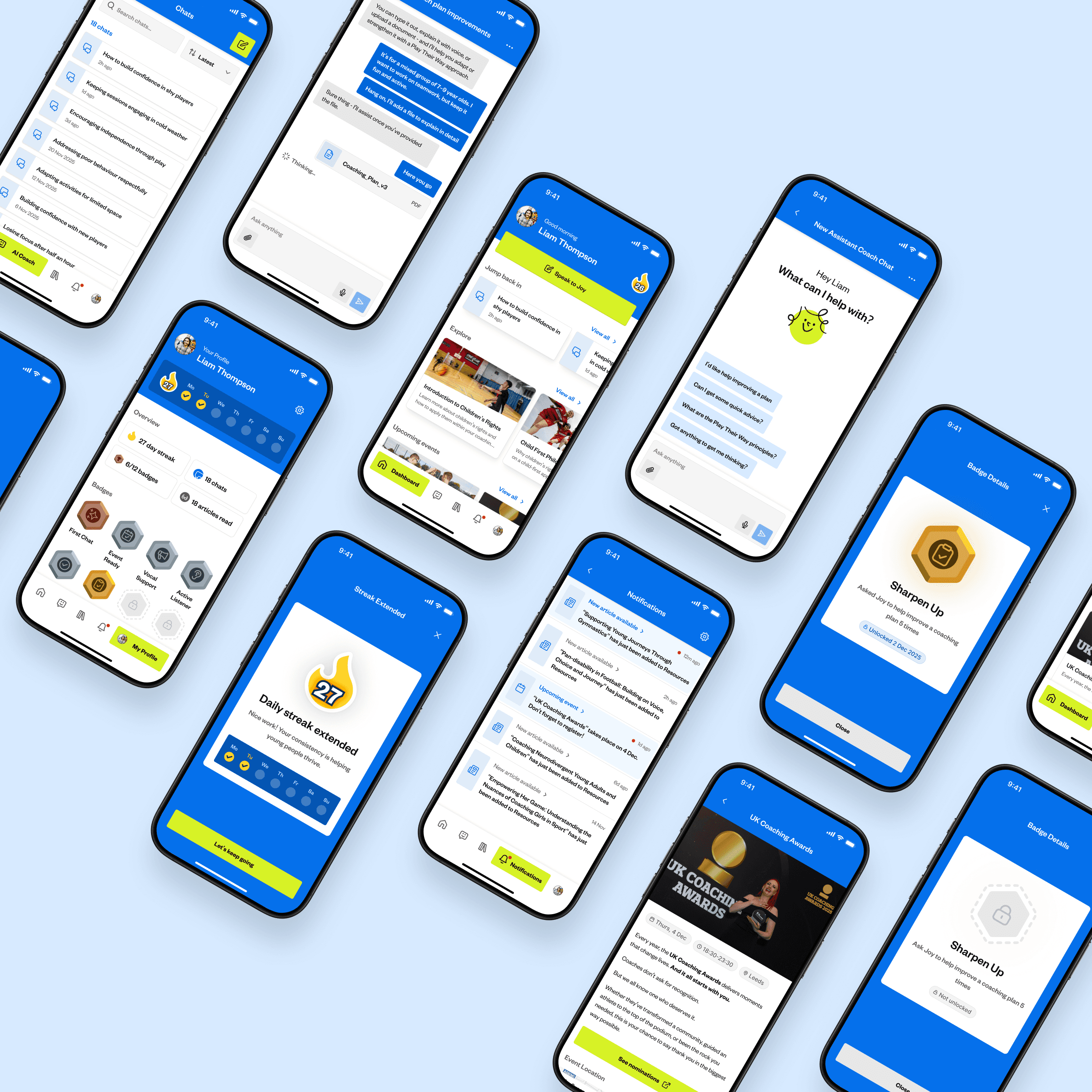
I designed the mobile app for Play Their Way, giving coaches, parents and volunteers one place to access child-first coaching resources, events and AI-powered support.
To assist user retention, I designed a Duolingo-inspired rewards system with badges and daily streaks. This was informed by Duolingo’s own reporting, which showed strong repeat engagement, with around 34.7% of users returning daily and over 10 million users holding year-long streaks.
I also created an internal Admin portal, enabling the Play Their Way team to publish content, manage events, send notifications and monitor user activity across the platform.
Source: Duolingo Q4/FY 2024 shareholder letter (Page 5)
Problem
Play Their Way already had a strong mission and a clear coaching philosophy, centred around Voice, Choice and Journey. The challenge was turning that mission into a practical mobile product that could support users beyond the website and encourage them to return regularly.
The app needed to support a broad audience, including coaches, parents and volunteers, who may all have different levels of experience, confidence and time available. Because of that, the experience needed to avoid feeling like a dense training platform or static knowledge base.
A key challenge was retention. A simple knowledge base would have been useful, but it risked becoming a passive library that users only opened when they needed something specific. For the app to support long-term behaviour change, users needed a visible sense of progress and a reason to keep engaging with the content, events and AI support.
Play Their Way already had a strong mission and a clear coaching philosophy, centred around Voice, Choice and Journey. The challenge was turning that mission into a practical mobile product that could support users beyond the website and encourage them to return regularly.
The app needed to support a broad audience, including coaches, parents and volunteers, who may all have different levels of experience, confidence and time available. Because of that, the experience needed to avoid feeling like a dense training platform or static knowledge base.
A key challenge was retention. A simple knowledge base would have been useful, but it risked becoming a passive library that users only opened when they needed something specific. For the app to support long-term behaviour change, users needed a visible sense of progress and a reason to keep engaging with the content, events and AI support.
Solution
The solution was to design the app around three connected areas: learning, support and progress.
The mobile app gives users a central place to browse articles, discover events, receive notifications, track progress and speak to Joy for AI-powered coaching support. This helped turn Play Their Way from a static source of information into a more active companion for a user’s coaching journey.
To encourage repeat engagement, a Duolingo-inspired gamification model was introduced, including badge collection, locked and unlocked badge states, progress tracking and daily streaks. This gave users a clearer sense of momentum, so that reading articles, registering interest in events and interacting with Joy became a path of exploration, rather than isolated actions.
The aim was not to copy Duolingo directly, but to apply a similar principle: use light gamification to support habit-building, recognise progress and make continued learning feel more rewarding.
Alongside this, the Admin portal was designed so the Play Their Way team could keep the app active after launch. This was important because the value of the app depends on fresh content, relevant events, timely notifications and visibility over how users are engaging.
The solution was to design the app around three connected areas: learning, support and progress.
The mobile app gives users a central place to browse articles, discover events, receive notifications, track progress and speak to Joy for AI-powered coaching support. This helped turn Play Their Way from a static source of information into a more active companion for a user’s coaching journey.
To encourage repeat engagement, a Duolingo-inspired gamification model was introduced, including badge collection, locked and unlocked badge states, progress tracking and daily streaks. This gave users a clearer sense of momentum, so that reading articles, registering interest in events and interacting with Joy became a path of exploration, rather than isolated actions.
The aim was not to copy Duolingo directly, but to apply a similar principle: use light gamification to support habit-building, recognise progress and make continued learning feel more rewarding.
Alongside this, the Admin portal was designed so the Play Their Way team could keep the app active after launch. This was important because the value of the app depends on fresh content, relevant events, timely notifications and visibility over how users are engaging.
Coach Experience
The app experience was designed around the idea that coaches, parents and volunteers should not have to work hard to find support.
The dashboard brings the main areas of the app together, including recent chats, articles, events, streaks and progress. This was done to reduce the feeling of starting from scratch each time the user opens the app. Instead, the app gives users clear routes back into useful actions.
The Resources section was designed as a practical knowledge base, with search, filters and sorting to help users find relevant guidance more easily. This was important because child-first coaching content can cover a wide range of topics, so users needed flexible ways to explore content based on their own needs.
The Events section was included because learning does not only happen through articles. Workshops, webinars and community events give users a way to continue developing outside the app, so surfacing them alongside resources helped connect digital learning with real-world participation.
The app experience was designed around the idea that coaches, parents and volunteers should not have to work hard to find support.
The dashboard brings the main areas of the app together, including recent chats, articles, events, streaks and progress. This was done to reduce the feeling of starting from scratch each time the user opens the app. Instead, the app gives users clear routes back into useful actions.
The Resources section was designed as a practical knowledge base, with search, filters and sorting to help users find relevant guidance more easily. This was important because child-first coaching content can cover a wide range of topics, so users needed flexible ways to explore content based on their own needs.
The Events section was included because learning does not only happen through articles. Workshops, webinars and community events give users a way to continue developing outside the app, so surfacing them alongside resources helped connect digital learning with real-world participation.
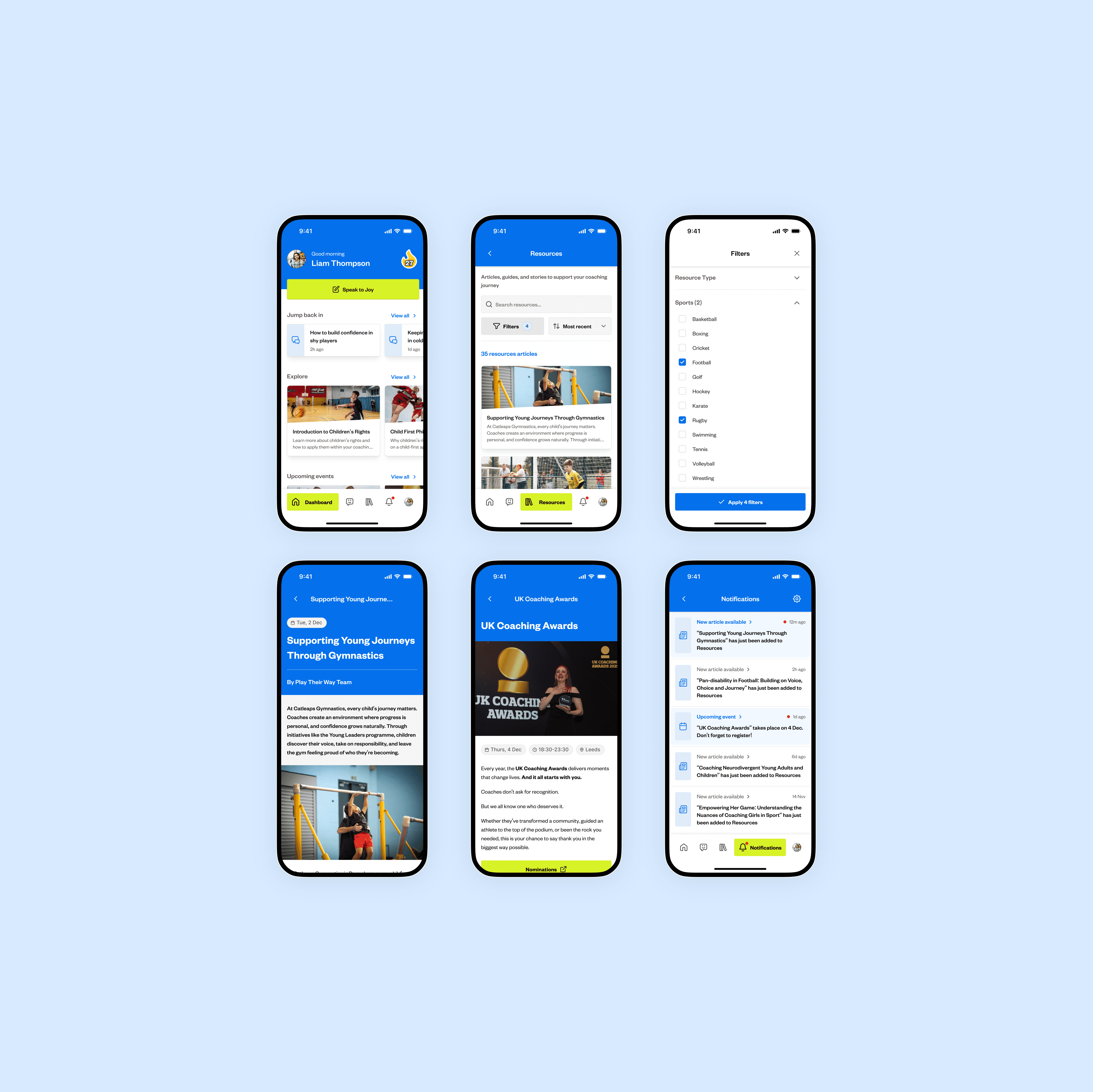
Coach views show the dashboard, resources, filters, article pages, event details and notifications used to access coaching support.
AI Coaching Assistant
Using Play Their Way's existing mascot, Joy, the AI assistant was designed to give users a more immediate and conversational way to access coaching support.
Suggested prompts were included to reduce blank-state anxiety. Instead of presenting users with an empty chat and expecting them to know what to ask, the interface gives them useful starting points, such as improving a plan, getting quick advice or learning about child-first principles.
Voice input and file upload were included because coaching support is often context-specific. The right guidance can depend on the session, age group, activity, constraints or plan the user is working with. Users may want to speak naturally, share an existing plan or ask for feedback on something they have already prepared. Supporting these input types made Joy more practical than a basic text-only chatbot.
Although I did not define Joy’s tone or safety rules, the interface needed to support the wider product requirement that AI responses stayed relevant, appropriate and aligned with child-first coaching.
Using Play Their Way's existing mascot, Joy, the AI assistant was designed to give users a more immediate and conversational way to access coaching support.
Suggested prompts were included to reduce blank-state anxiety. Instead of presenting users with an empty chat and expecting them to know what to ask, the interface gives them useful starting points, such as improving a plan, getting quick advice or learning about child-first principles.
Voice input and file upload were included because coaching support is often context-specific. The right guidance can depend on the session, age group, activity, constraints or plan the user is working with. Users may want to speak naturally, share an existing plan or ask for feedback on something they have already prepared. Supporting these input types made Joy more practical than a basic text-only chatbot.
Although I did not define Joy’s tone or safety rules, the interface needed to support the wider product requirement that AI responses stayed relevant, appropriate and aligned with child-first coaching.
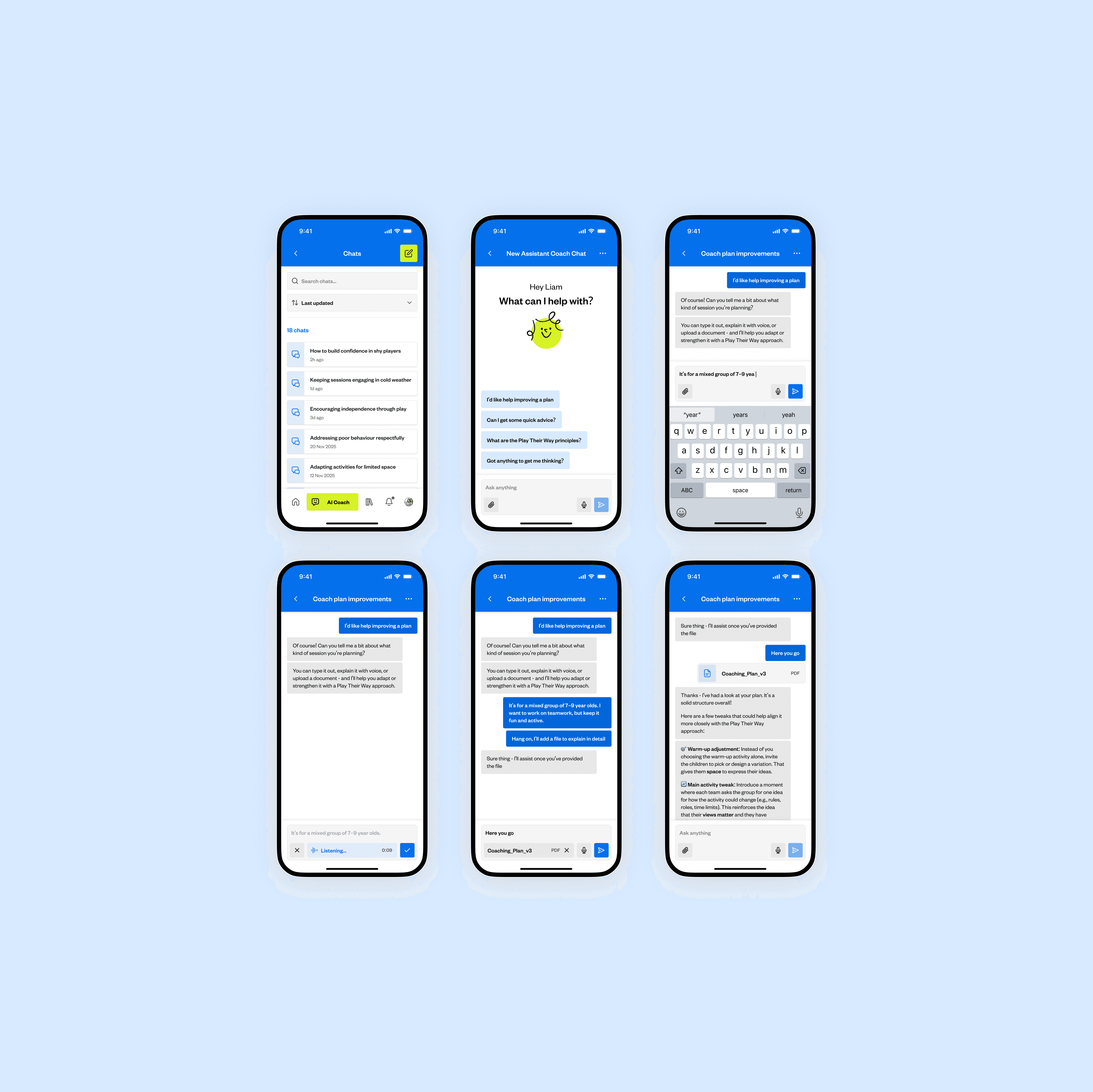
AI assistant views show Joy’s prompts, chat history, typed input, voice input, file uploads and coaching plan feedback.
Gamification & Retention
The project scope included gamification, so the UX challenge was deciding how that should work in a way that felt useful, relevant and appropriate for a child-first coaching app.
Working on this with the PM, we decided that badges and daily streaks were the strongest route because they could support repeat engagement without adding unnecessary complexity. Badges felt familiar within the wider coaching context, where progress is often recognised through certificates, qualifications and achievement-based milestones. Daily streaks supported a different behaviour, helping users see consistency over time and encouraging them to keep returning for coaching support.
We used Duolingo as a reference because Play Their Way shares a similar behavioural challenge: helping users build habits through small, repeated learning actions. Duolingo’s public reporting shows how streaks, rewards and engagement can support repeat use in a learning product, so we applied a similar principle.
Badges were designed around meaningful actions, such as reading articles, starting chats, viewing events and using Joy to improve coaching plans. This helped ensure rewards were linked to genuine coaching engagement, rather than arbitrary activity.
Locked and unlocked badge states were used to make progress clearer. Users can see what they have already achieved and what actions are available next, giving the profile area more purpose and making progress feel more satisfying.
The project scope included gamification, so the UX challenge was deciding how that should work in a way that felt useful, relevant and appropriate for a child-first coaching app.
Working on this with the PM, we decided that badges and daily streaks were the strongest route because they could support repeat engagement without adding unnecessary complexity. Badges felt familiar within the wider coaching context, where progress is often recognised through certificates, qualifications and achievement-based milestones. Daily streaks supported a different behaviour, helping users see consistency over time and encouraging them to keep returning for coaching support.
We used Duolingo as a reference because Play Their Way shares a similar behavioural challenge: helping users build habits through small, repeated learning actions. Duolingo’s public reporting shows how streaks, rewards and engagement can support repeat use in a learning product, so we applied a similar principle.
Badges were designed around meaningful actions, such as reading articles, starting chats, viewing events and using Joy to improve coaching plans. This helped ensure rewards were linked to genuine coaching engagement, rather than arbitrary activity.
Locked and unlocked badge states were used to make progress clearer. Users can see what they have already achieved and what actions are available next, giving the profile area more purpose and making progress feel more satisfying.
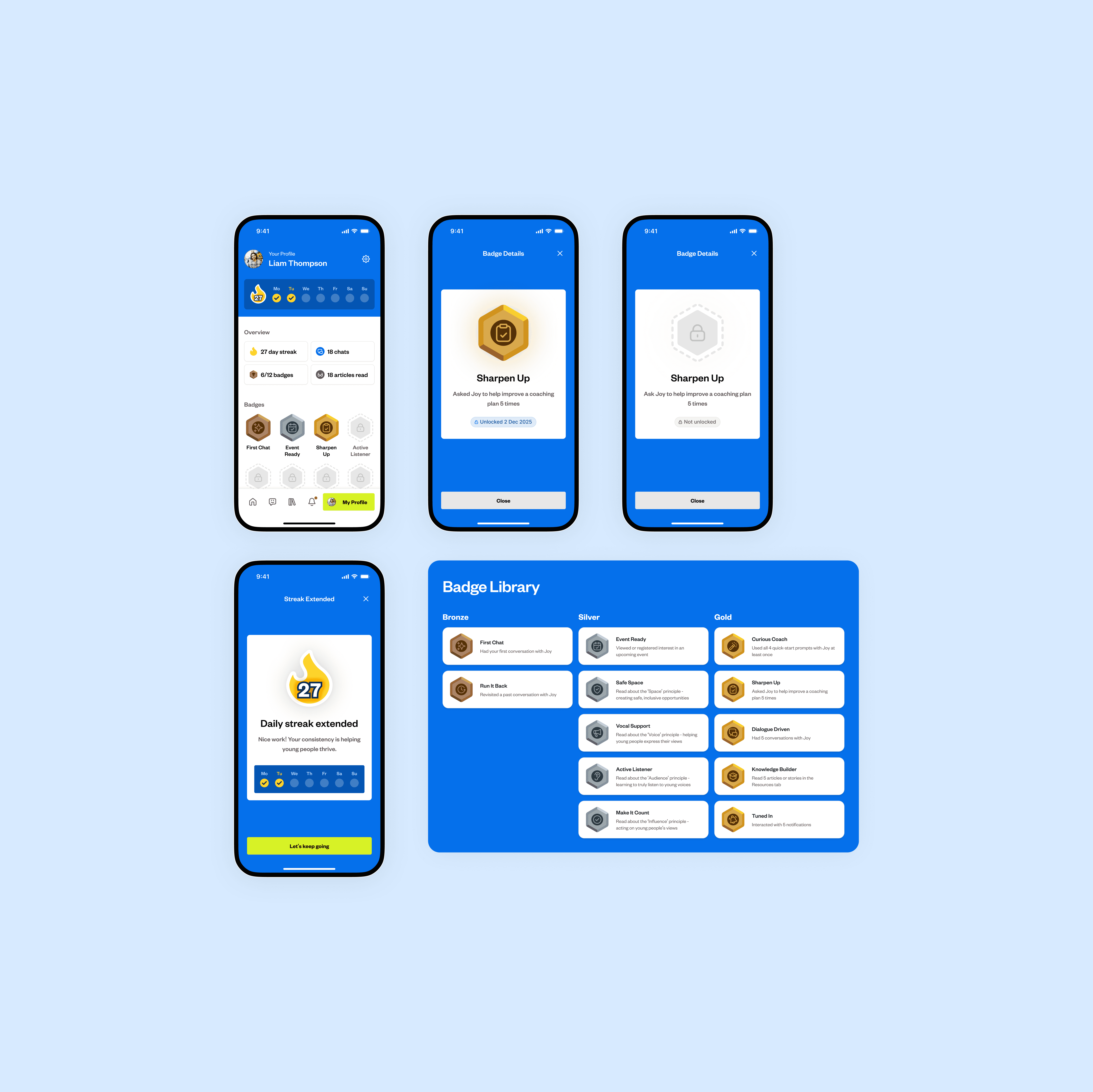
Gamification views show profile progress, badge states, streaks and the badge library used to make engagement feel satisfying.
Admin Experience
The Admin portal was designed as a lightweight CMS to help the Play Their Way team keep the app active after launch, giving them a way to add content, send updates and check basic engagement.
The main UX challenge was making admin tasks feel quick but controlled. To support this, I designed task-led areas for content, notifications and coach activity, with dashboard shortcuts for the most common actions.
For content, the portal lets admins import Play Their Way articles and events from their website by URL, then preview how they will appear in the app before publishing. This reduced manual input while still giving the team a clear review step before anything went live.
For notifications, I designed a guided flow where admins can link a message to an article or event, choose whether to send it immediately or schedule it, and confirm the final version before sending. This helped reduce the risk of incorrect or unclear updates being pushed to users.
Across the portal, table views, filters, statuses and detail modals were used to keep management tasks efficient. Admins could quickly see what was live, what was scheduled, what needed attention and how coaches were engaging through chats and badges collected.
The Admin portal was designed as a lightweight CMS to help the Play Their Way team keep the app active after launch, giving them a way to add content, send updates and check basic engagement.
The main UX challenge was making admin tasks feel quick but controlled. To support this, I designed task-led areas for content, notifications and coach activity, with dashboard shortcuts for the most common actions.
For content, the portal lets admins import Play Their Way articles and events from their website by URL, then preview how they will appear in the app before publishing. This reduced manual input while still giving the team a clear review step before anything went live.
For notifications, I designed a guided flow where admins can link a message to an article or event, choose whether to send it immediately or schedule it, and confirm the final version before sending. This helped reduce the risk of incorrect or unclear updates being pushed to users.
Across the portal, table views, filters, statuses and detail modals were used to keep management tasks efficient. Admins could quickly see what was live, what was scheduled, what needed attention and how coaches were engaging through chats and badges collected.
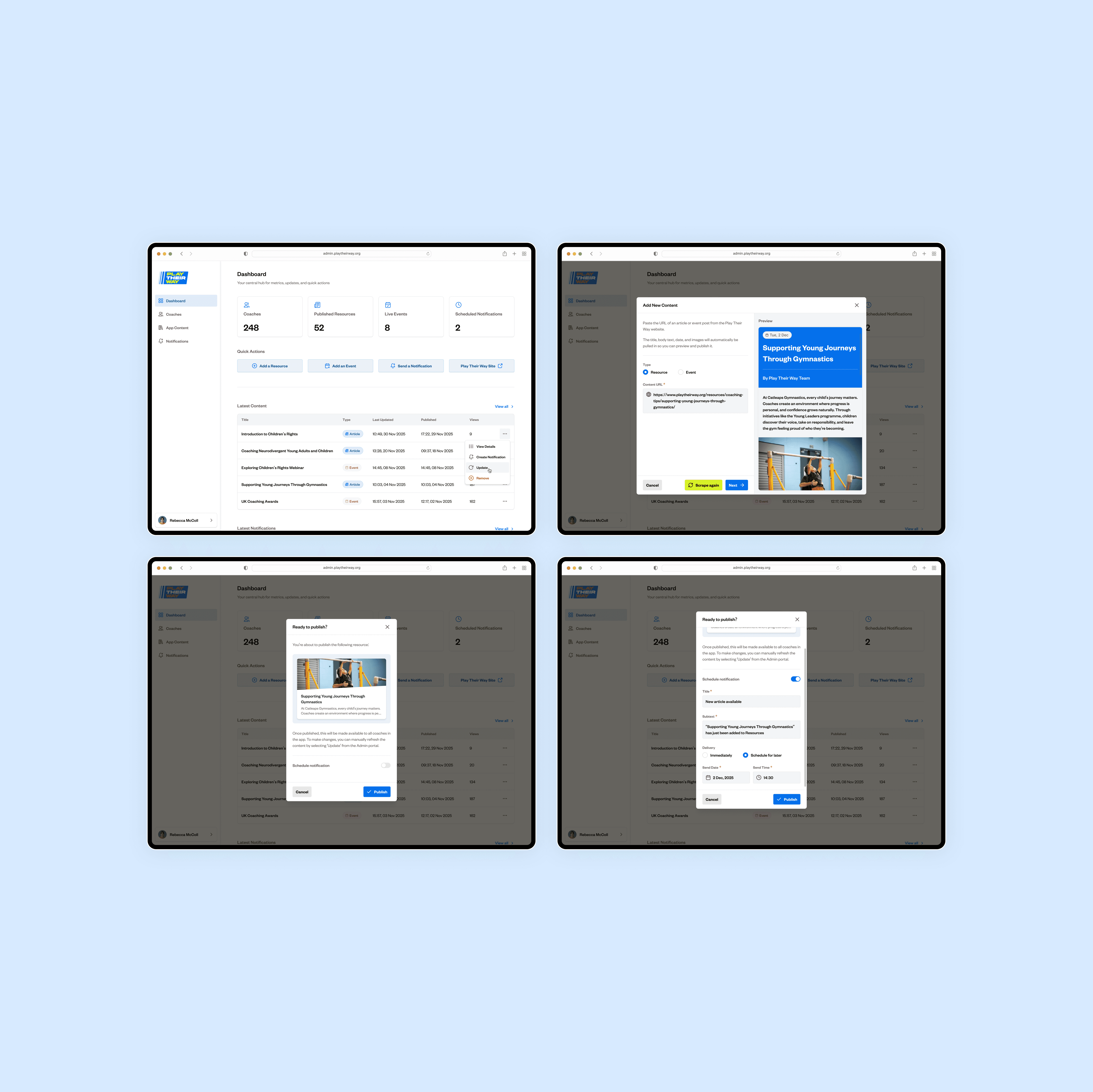
Admin views show content importing, app previews, publish checks and notification flows used to manage the app after launch.